When you set up a plan
Five ways to use service plans to run your whole client base
One service plan can switch on CyberSentry monitoring, security awareness training, scheduled meetings and client health scoring for every client on it, run a zero price pilot, stack a per-seat add-on on a flat Core plan, roll it into one invoice and price by client size, and Elise can list, build and subscribe plans for you.
See it
 2. Check who that switch actually reaches.
 3. Build a second plan priced at zero.
 4. Give the zero-price plan its own switch, then subscribe a client to it.
 5. Open the new subscription and read what it bills.
 6. On a paying client, look at the Core plan already doing the per-tenant billing.
 7. Add a per-seat plan on top as an Add-On.
 8. Set the add-on's count by hand and roll it into the Core invoice.
 11. Know where a plan's reach stops.
Browse
On this page
How to do it
Open a plan and pick Included functions on the left side bar.
The plan page shows one section at a time, listed down the left side bar. Included functions on Managed Desktop lists four switches: CyberSentry security monitoring, Security awareness training, Scheduled meetings & agendas and Client health scoring. Only Security awareness training is on. Turning one on puts every client with an active subscription on this plan in scope for it, wherever it runs in the portal. Nothing is set on the client itself.
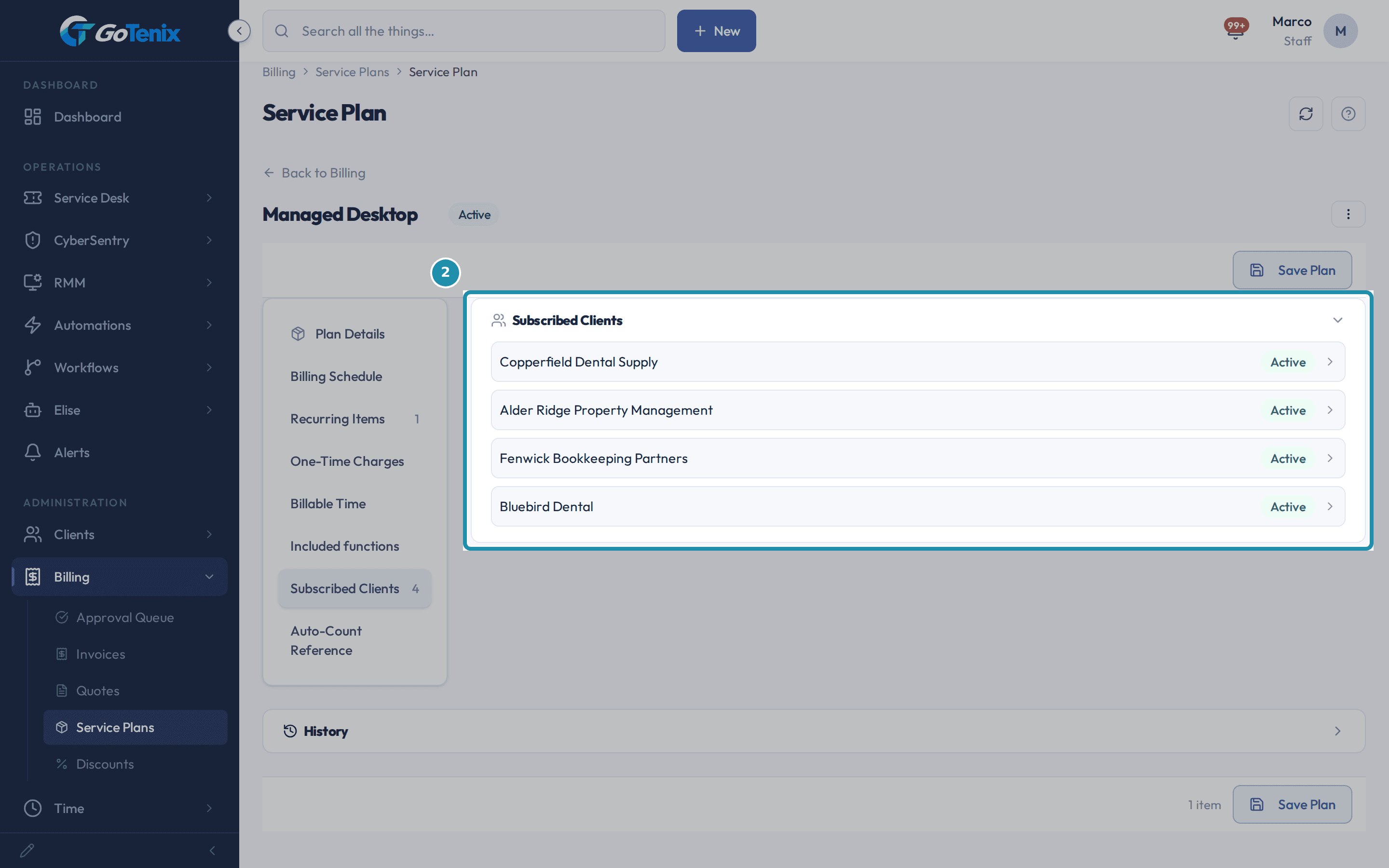
Open a plan and pick Included functions on the left side bar. Check who that switch actually reaches.
Pick Subscribed Clients on the left side bar. It lists the clients on Managed Desktop, Bluebird Dental among them, each Active. Bluebird Dental gets the function through its active subscription to this plan, not through a setting on its own record.
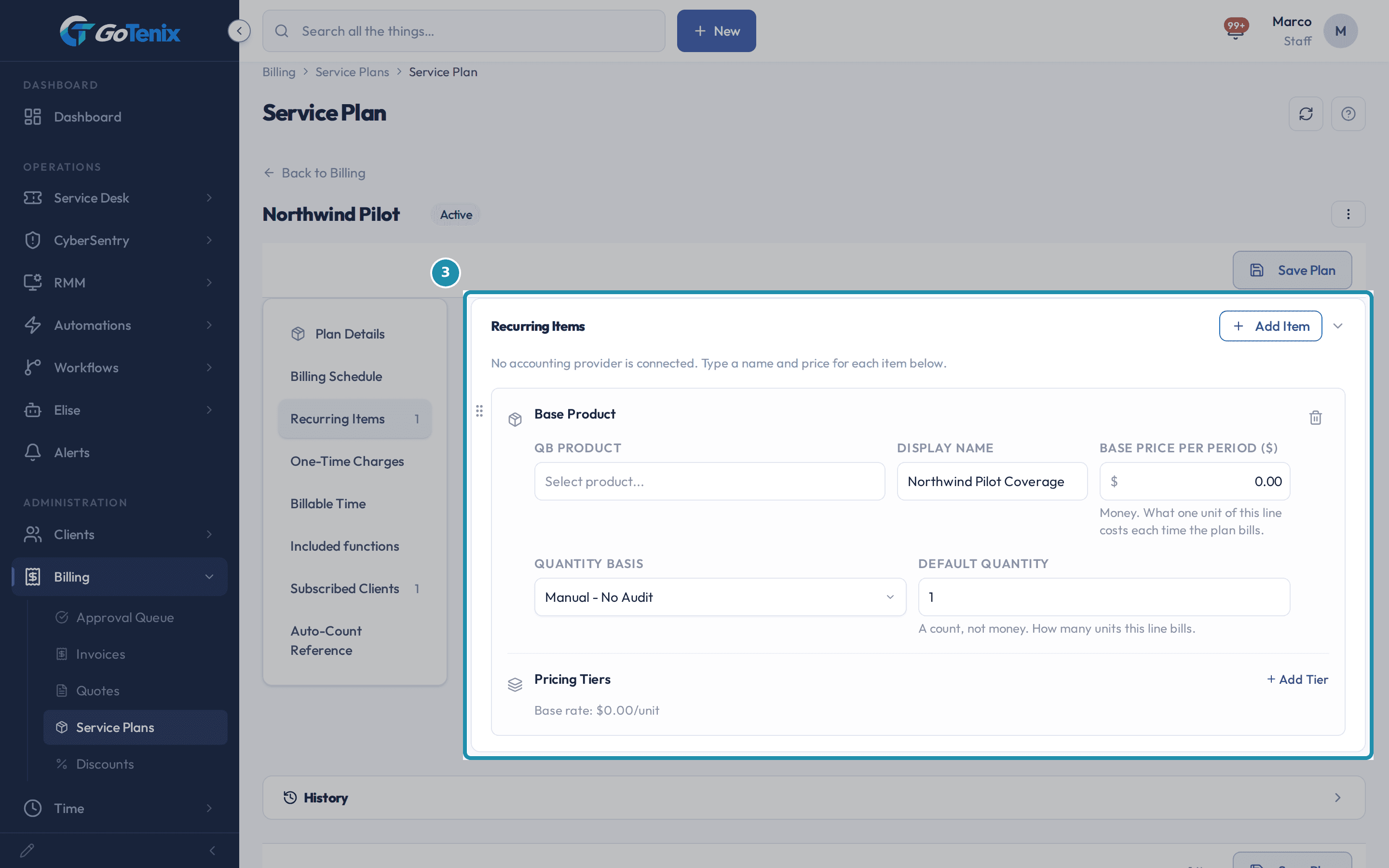
Check who that switch actually reaches. Build a second plan priced at zero.
Pick Recurring Items on the left side bar of Northwind Pilot. It has one recurring item with a base price of 0, the Manual - No Audit quantity basis and a default quantity of 1. The Pricing Tiers line under it reads Base rate: $0.00/unit. A plan does not need a price to be a real plan. It still saves, still has its own Included functions and still takes subscriptions.
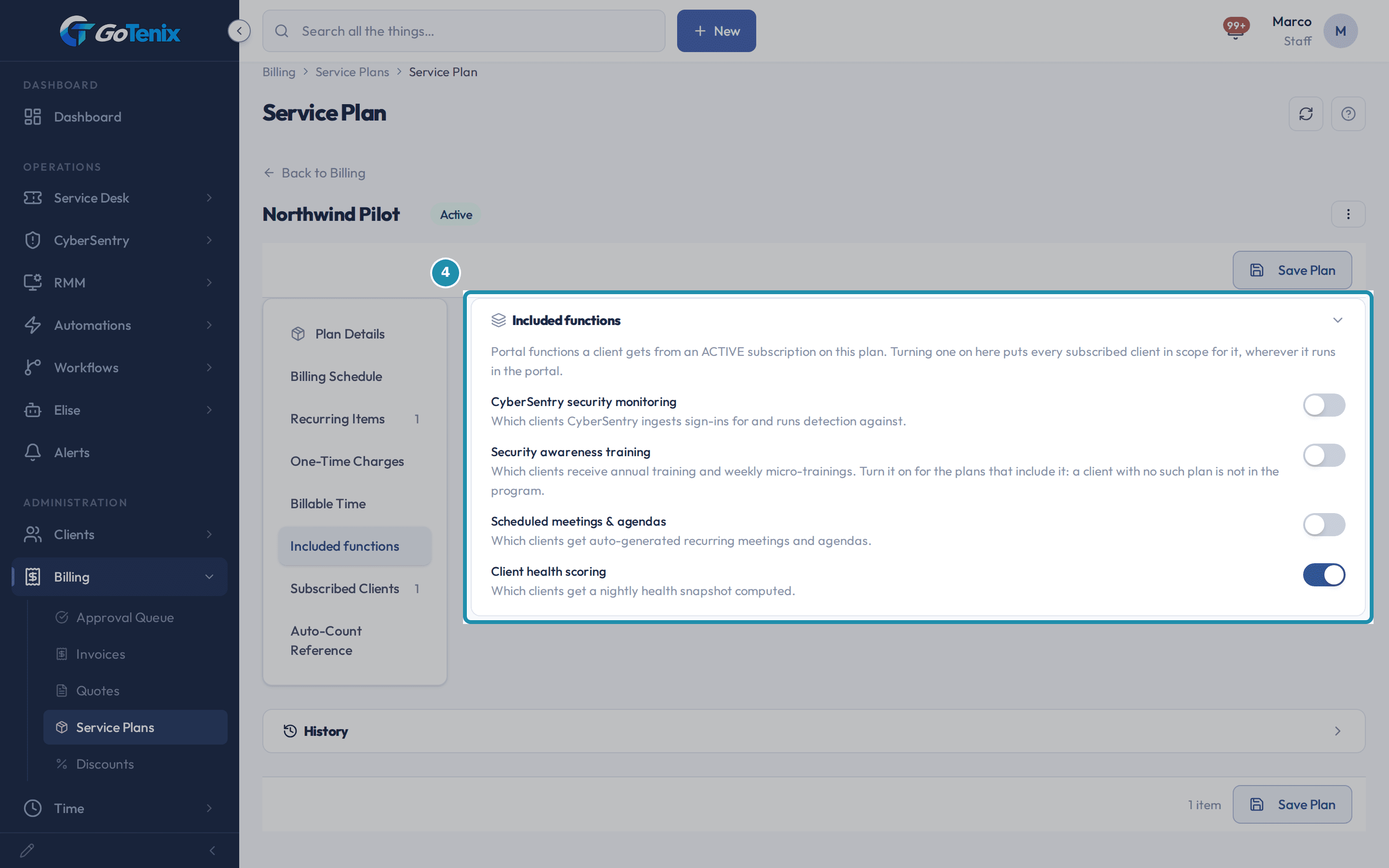
Build a second plan priced at zero. Give the zero-price plan its own switch, then subscribe a client to it.
On Northwind Pilot, Included functions shows Client health scoring on instead of Security awareness training, so a different plan can switch on a different function. Subscribed Clients, on the same side bar, now lists Harbor Freight Logistics, Active. Subscribing a client to a $0 plan is the same step as subscribing to a $150 one.
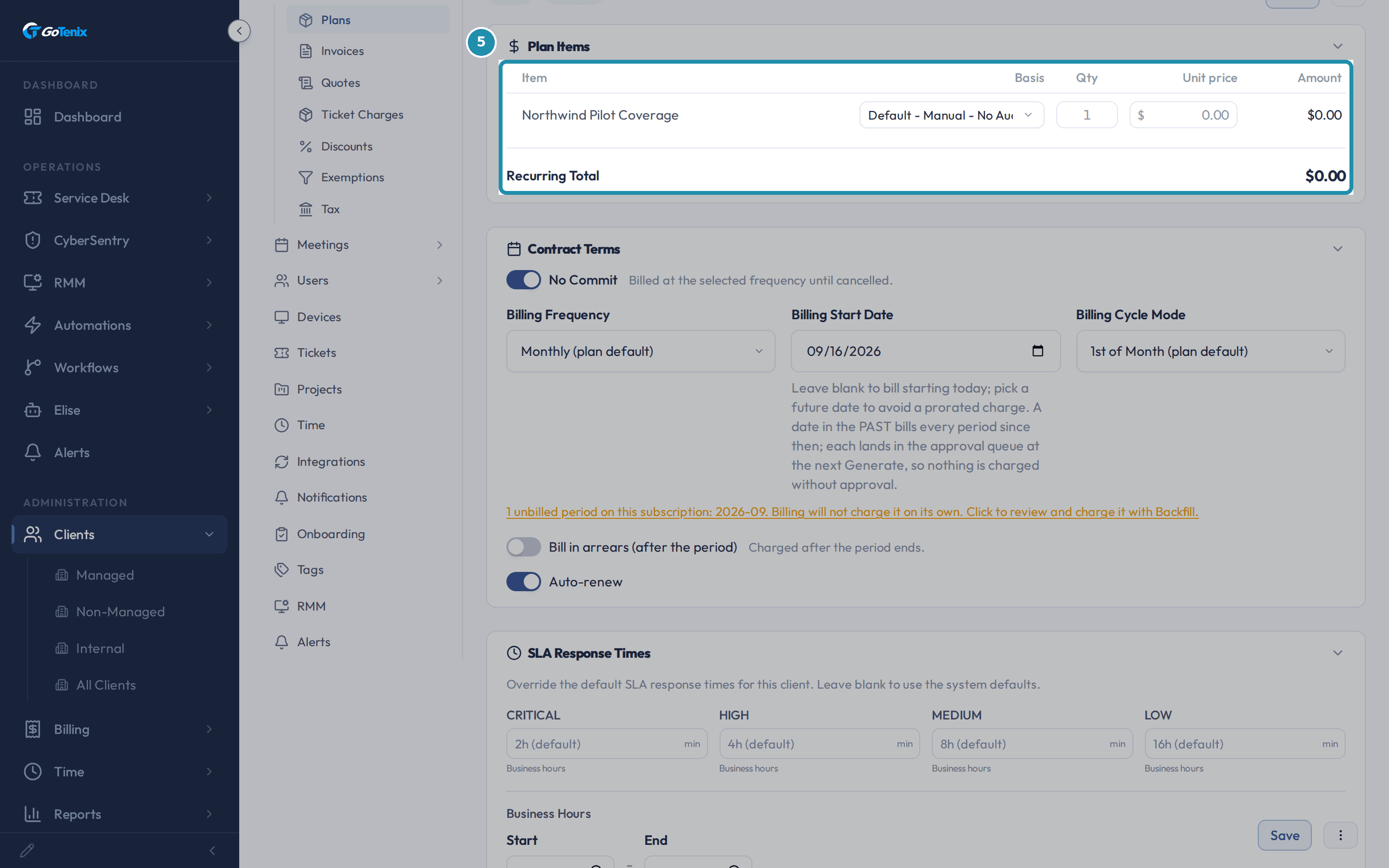
Give the zero-price plan its own switch, then subscribe a client to it. Open the new subscription and read what it bills.
Plan Items shows Northwind Pilot Coverage at a $0.00 unit price and a $0.00 amount, and the Recurring Total reads $0.00. It is a full subscription with its own Contract Terms and SLA Response Times. Portal wording for a plan priced at zero: nothing bills, no invoice reaches the Approval Queue, and the agreement stays in Draft until you press Send for Approval or Mark as Accepted.
Open the new subscription and read what it bills. On a paying client, look at the Core plan already doing the per-tenant billing.
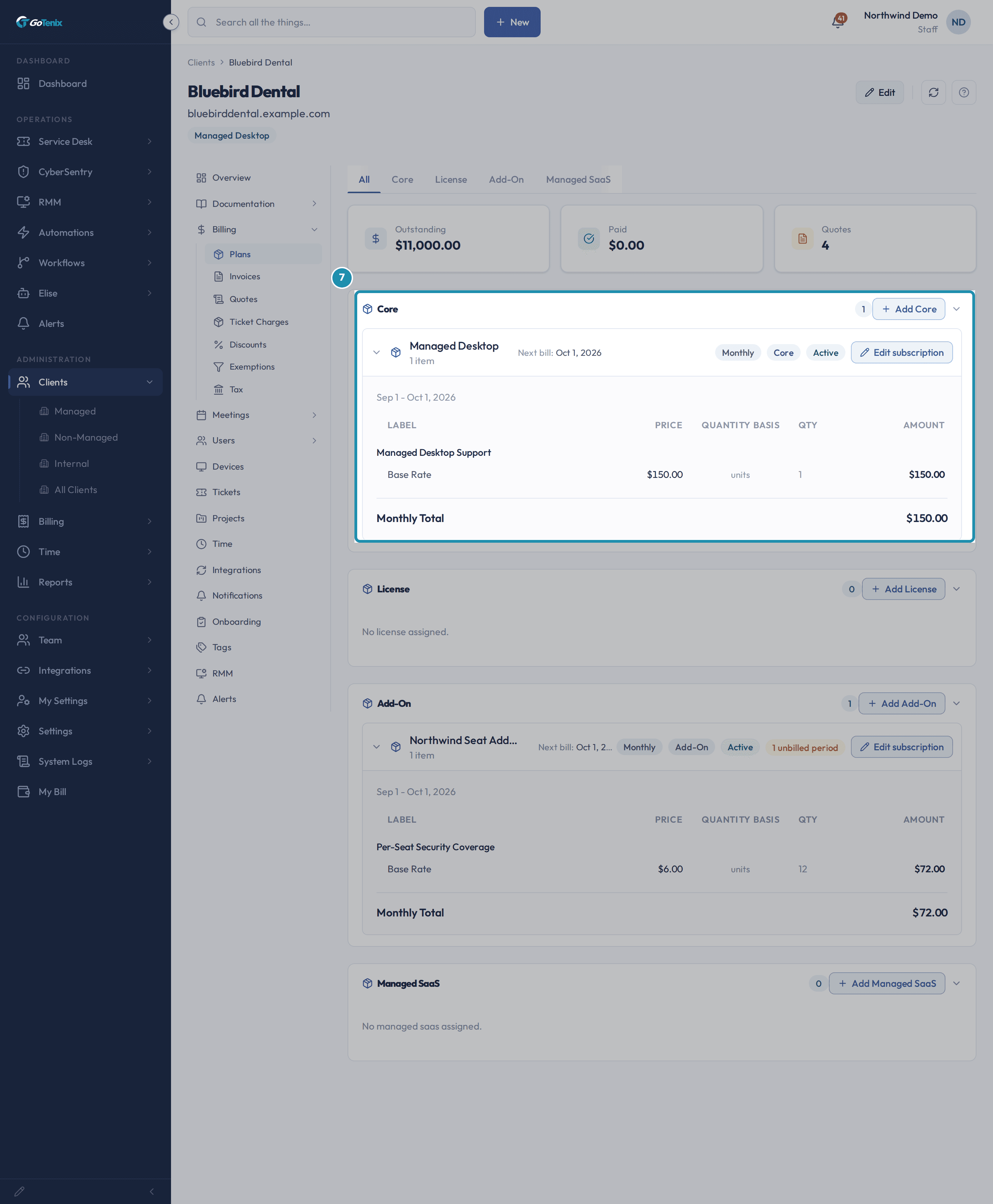
Bluebird Dental's Core section shows Managed Desktop with one line, Managed Desktop Support, at a Base Rate of $150.00 and a quantity of 1, for a $150.00 Monthly Total. It is one flat price for the whole client.
On a paying client, look at the Core plan already doing the per-tenant billing. Add a per-seat plan on top as an Add-On.
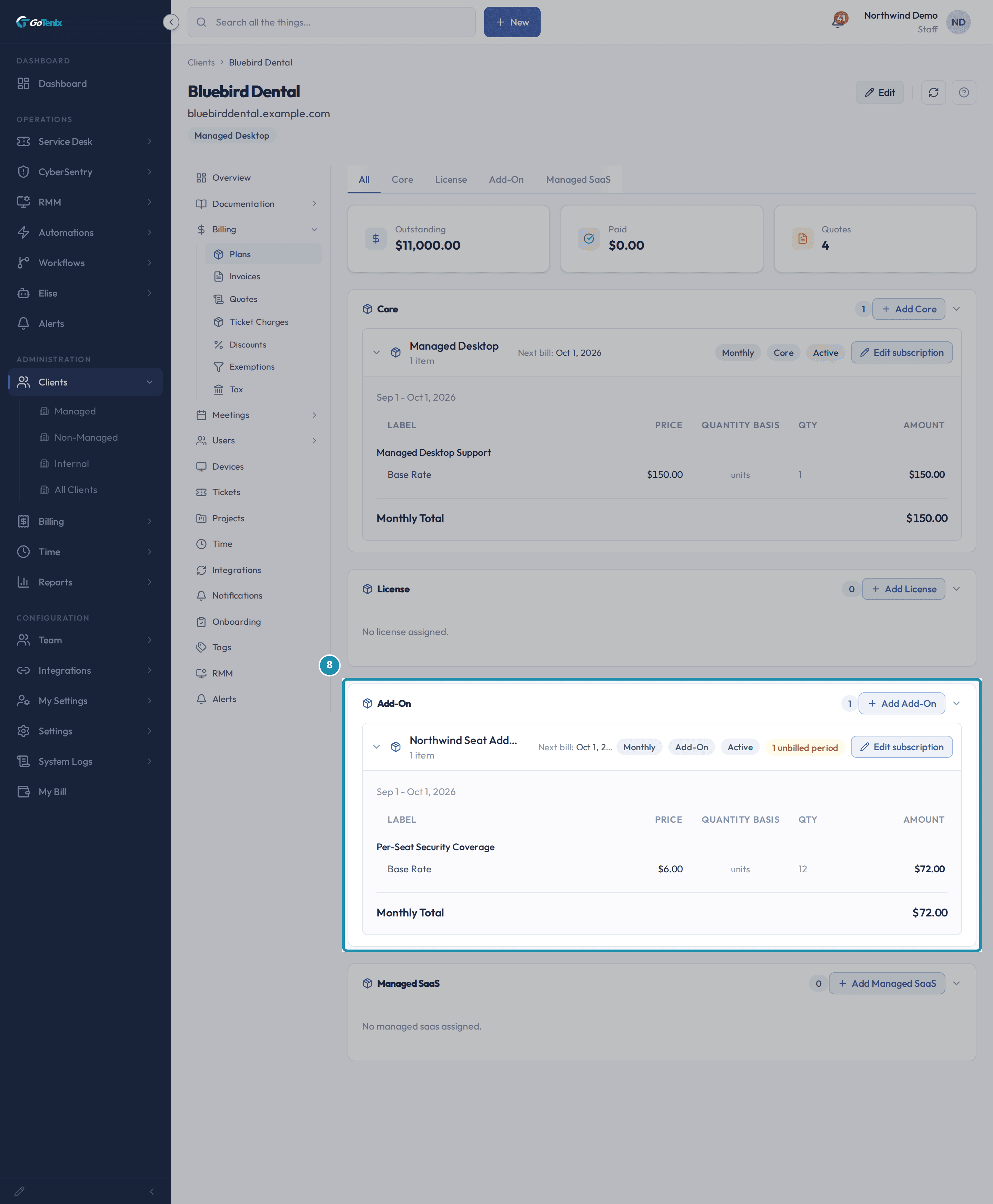
The Add-On section shows Northwind Seat Add-on with one line, Per-Seat Security Coverage, at a Base Rate of $6.00, quantity 12, for a $72.00 Monthly Total, next to the $150.00 Core total. A flat line and a per-seat line sit on one client from two plans. The orange 1 unbilled period chip means that period has no invoice yet. Its banner on the subscription says billing will not charge it on its own and offers Backfill.
Add a per-seat plan on top as an Add-On. Set the add-on's count by hand and roll it into the Core invoice.
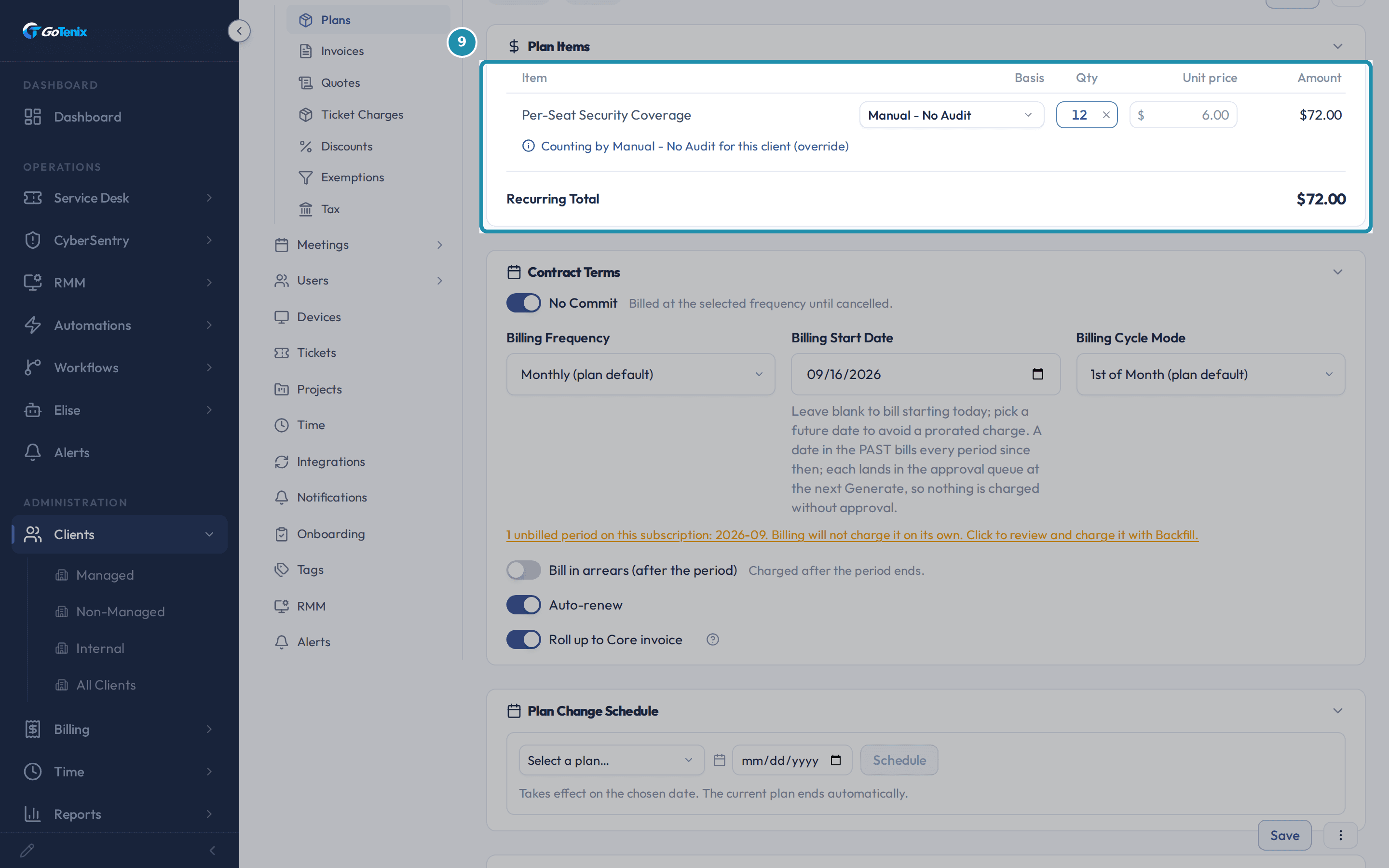
In Plan Items the line carries the note Counting by Manual - No Audit for this client (override), so you set the count by hand. Below, Roll up to Core invoice is on. It merges this subscription's line items onto whichever Core invoice's date window covers its billing period, instead of generating its own invoice.
Set the add-on's count by hand and roll it into the Core invoice. Price by client size.
On a plan, a price row set to the Band basis uses the Pricing Bands table: a flat monthly price per client size, where the band a client lands in supplies the whole amount. Bands must cover from the lowest count with no gaps. On any recurring item, Add Tier under Pricing Tiers adds a named tier priced as an absolute price, dollars off or percent off the base rate.
Reuse a plan and choose how the first bill starts.
Duplicate plan makes a copy to adjust. Prorate first bill immediately is a plan switch. On, billing starts on the plan start date, prorated to the cycle. Off, the first bill aligns to the cycle day.
Know where a plan's reach stops.
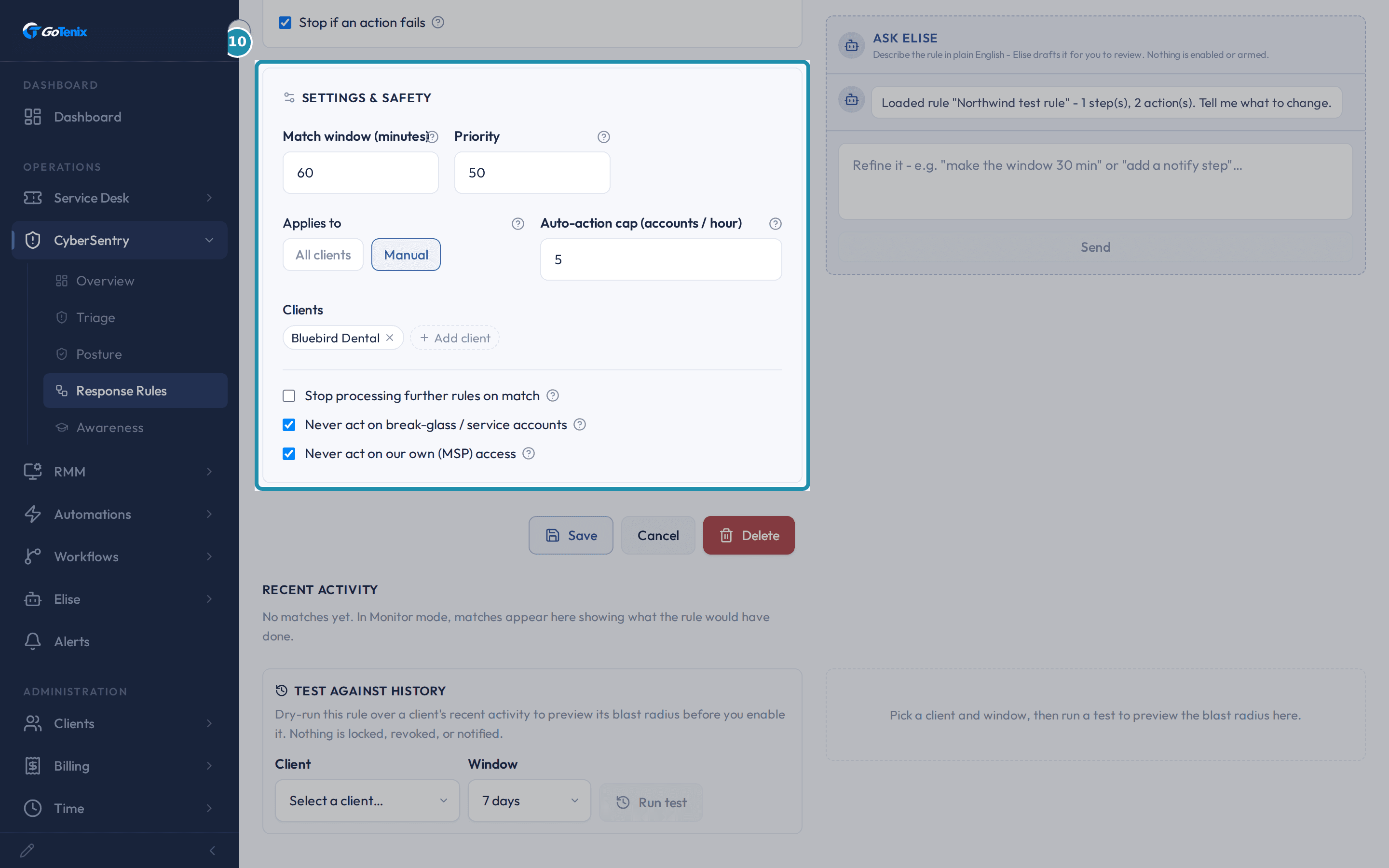
A CyberSentry Response Rule scopes with Applies to set to All clients or Manual and a Clients list. The RMM Patch Catalog Install on many devices dialog targets a Client, a Tag or a Policy. Neither offers a plan as a scope.
Know where a plan's reach stops.
The pages behind each click
What you will have
- Way 1, switch functions on by plan: tick CyberSentry security monitoring, Security awareness training, Scheduled meetings & agendas or Client health scoring under Included functions, and every client with an active subscription is in.
- Way 2, run a pilot at zero: give an internal or pilot client a plan priced at $0.00 that still holds a real subscription.
- Way 3, stack a per-seat add-on: put a per-seat plan beside a flat Core plan on the same client.
- Way 4, one invoice: roll the add-on into the Core invoice, and set the count by hand for one client when you need to.
- Way 5, price by size: use Pricing Bands, Pricing Tiers, Duplicate plan and Prorate first bill immediately.
- Ask Elise to list plans, create one, copy tiers across lines and subscribe a client.
Why it works this way: Five ways to use service plans to run your whole client base
A $0.00 plan is a real plan. It has its own subscription, Contract Terms and Included functions, so a pilot client can sit on it like any other.
Included functions work through the active subscription. Two clients on two different plans can have two different functions on.
A subscription's count can be typed in for one client. The note under the line says Counting by Manual - No Audit for this client (override).
Roll up to Core invoice is set per subscription. The same plan can roll up for one client and bill on its own for another.
Other ways to do this: Five ways to use service plans to run your whole client base
Ask Elise to read your plans
Ask Elise "list our service plans" or "show me the Managed Desktop plan with its price rows and how many clients are on it", or "list the subscriptions for Bluebird Dental".
Ask Elise to build and change
Ask "create a service plan called Northwind Pilot", "add these pricing tiers to the other lines on this plan", "subscribe Bluebird Dental to the Northwind Seat Add-on" or "generate the invoice for this subscription now". She asks you to confirm each change before it is made.
If it did not work: Five ways to use service plans to run your whole client base
- If an Included function does not reach a client, check that the client's subscription to that plan is active.
- If a plan does not appear as a choice on a Response Rule or a patch push, that is expected. Those screens scope by client, tag or policy.
- If you cannot delete a plan, check its subscriptions. The portal says plans with active subscriptions cannot be deleted.
Questions this page answers
What is the Pricing Bands table for?
Pricing Bands is not a card of its own. It appears under a price row. Open the plan's Recurring Items, add or edit a price row, and set its Quantity Basis to "Band (flat price by client size)". A "Pricing Bands" table appears under that row. Add one band for each price point, with a starting technician count. Each band prices the WHOLE plan for that range, not a rate per unit. The table only bills once one price row on the plan uses the Band basis.
What happens above my highest band?
That depends on whether the top band in the Pricing Bands table has an ending count. Leave it blank and the top band is open ended: every count above its start bills at that price. Fill it in and the table CLOSES there. A client above that count has no price at all, and every surface refuses out loud rather than quietly billing them the top band's rate: assignment, the monthly evaluation, invoice generation, and the client's own billing card. That is deliberate. It is how you make large sizes quoted instead of listed. The client's existing band keeps billing correctly meanwhile. What you owe them is a quote, not a fix.
Why was my Pricing Bands table rejected?
Bands have to cover every count with exactly one band, so Save Plan refuses three shapes: a GAP (a band ends at 4 and the next starts at 8, leaving 5-7 unbilled), an OVERLAP (two bands claiming the same count, so which one prices it is ambiguous), and a table that does not start at the first count (a lowest band starting at 3 leaves clients with 1 or 2 unpriced). It also refuses a band with no price, or a zero or negative one - that is not a price. Each of these is a money bug, so it is refused when you click Save Plan rather than discovered on the 1st of the month.
Can I change a band that clients are already on?
Not while they are on it. A client follows the bands of the plan they hold, so changing a band's price reprices every client sitting in it from their next invoice, and deleting a band leaves them pointing at a price that no longer exists. Save Plan refuses both and names which clients are affected. To raise prices, use Duplicate plan (in the ⋯ menu) to publish a NEW plan with the new bands, then move clients onto it as you agree the change with them - that keeps existing customers on what they signed up for, which is the whole point of a fixed price list. Adding a band, widening one, or editing a band nobody is on are all fine.
When does a client actually move between bands?
A client is billed at a stored band, not at their live count, and only one thing moves it: a monthly evaluation on the 1st that looks at the month just closed. The band for that month is the HIGHEST count reached during it, so someone hired on the 15th does not silently reprice an invoice that already went out. If the closed month peaked into a higher band, the difference is billed as a separate prorated catch-up covering the crossing day to month end, and the client moves up before that morning's regular invoice. Moving DOWN takes effect for future billing only - a month already billed at the higher band is not credited back.
What does "Duplicate plan" do?
It clones this plan - name, pricing, its full item/tier list, and its pricing bands - into a brand-new plan named "<Plan name> (Copy)" with no clients subscribed yet, so you can adjust the copy without touching clients already on the original. Discounts and client subscriptions are not copied - those belong to a client, not to the plan template. Find it in the ⋯ menu next to Save. It is not available on Pax8-managed plans, since those follow the distributor subscription rather than being hand-authored templates.
What does "Prorate first bill immediately" do?
It controls whether a plan that starts partway through a billing cycle bills a prorated first invoice, and when that first charge lands. It affects the amount, not only the timing. With it OFF (the default), the plan does not bill a prorated first period: regular billing simply begins on the plan's normal cycle date, and the partial stretch between the start date and that first cycle date is not billed. With it ON, the first invoice fires on the trial-end / start date and bills only the prorated amount for the remaining days of that first period; full periods then bill on the normal cycle thereafter. So the real difference is that partial first stretch: ON charges for it (prorated), OFF leaves it unbilled. Turn it on when a client starts mid-cycle (e.g. a trial converting to paid) and you want to charge them for their partial first period up front instead of starting them on the next full cycle for free.
What is invoice rollup?
Rollup merges lines from other plans onto one target invoice, so a client gets ONE bill instead of one per add-on. The target is the plan type flagged as the rollup target, which is Core on a fresh install. A Core invoice covers a date window on the Core plan's own cycle, not a single calendar month. Each merged line names its own period. So a Core line may read one month while an add-on line right below it reads the next. That is expected. See the answer on how a rolled up plan finds the right Core invoice for why. Rollup happens when invoices are made, not when you approve them. By the time an invoice reaches the queue, the merge is already done.
How do I turn rollup on for one plan?
Every non Core plan on a client has a Roll up to Core invoice switch. You find it under Client > Billing > Plans. On, and the nightly run merges that plan's lines onto whichever Core invoice window covers its period. Off, and the plan makes its own invoice. The switch is per plan, so a client can have some add-ons merged and others on their own. It is greyed out and forced off when the plan's category has Single invoice turned on. You set that on the plan categories table at Settings > Billing & Pricing > Plans & Pricing. A category rollup and a Core rollup cannot both apply. One plan cannot ride two combined invoices at once.
What does overriding a line's quantity basis do?
Each subscription line normally counts by its plan's quantity basis. The override picker on a line lets THIS client count it differently - switch an automated line to Manual to type a fixed number yourself, or point it at a different automated source instead, including a specific Microsoft 365 license (a SKU picker appears once you choose that option). It works both directions: an automated line can go Manual, and a Manual or plan-default line can be pointed at a different automated source. A line married to a distributor subscription (Pax8) can't be overridden - its quantity stays locked to what the distributor reports. Whichever basis you land on, the quantity itself only recalculates after you Save; the row shows "-" until then.
Was this helpful?