Month end
How to go from agreements to invoices at month end
At month end, Billing shows you which invoices are waiting for approval, which billable time will not invoice and why, and each client's invoices in one place; approve the queue, build ticket charges when you need them early, and ask Elise to do the rounds.
See it
Browse
On this page
How to do it
Open Billing, then Approval Queue.
The queue holds invoices in Pending Approval. For each one you can approve, reject or skip. Approve gives the invoice a number, makes it payable, queues the push to QuickBooks if you use it, and cannot be undone. Reject deletes the pending invoice and charges nothing. The period is still owed: it re-bills at the next Generate if it is still due, and otherwise shows as an unbilled period you can charge later. Skip applies to plan invoices only, can record a reason, and the period will never regenerate, so use it on purpose.
Open a client's Billing tab, then Ticket Charges, and read what will not invoice.
Pending charges show Materials, Time and Combined. A banner called "Time that won't invoice" names each ticket whose billable time is stuck, with the reason. The reason is either "No hourly rate set on billing status" or "Billing status has no mapped product". Time is priced only when its ticket's billing status has both an hourly rate and a mapped product, which is a QuickBooks product.
Fix the cause on the ticket.
Open the ticket and change its Billing status on the toolbar, or give the status the rate or product it is missing. Even when time is priced, it waits for its ticket to close and for the next ticket charges run.
Build a client's ticket charges early.
On the client's Billing, then Invoices, press Generate Ticket Charges Now. The dialog asks you to confirm and says it rebuilds a pending invoice, which then waits in the Approval Queue, with every currently billable issued item and billable time entry. If nothing qualifies, it says "Nothing eligible to bill right now." You need billing permission to press it.
Read an invoice that came from a plan.
Open the invoice. Source says Core, Period names the month and Plan names the plan. Approved By shows the person who approved it from the queue. Line Items shows what was billed.
Read an invoice that came from a plan. Read an invoice that came from a quote.
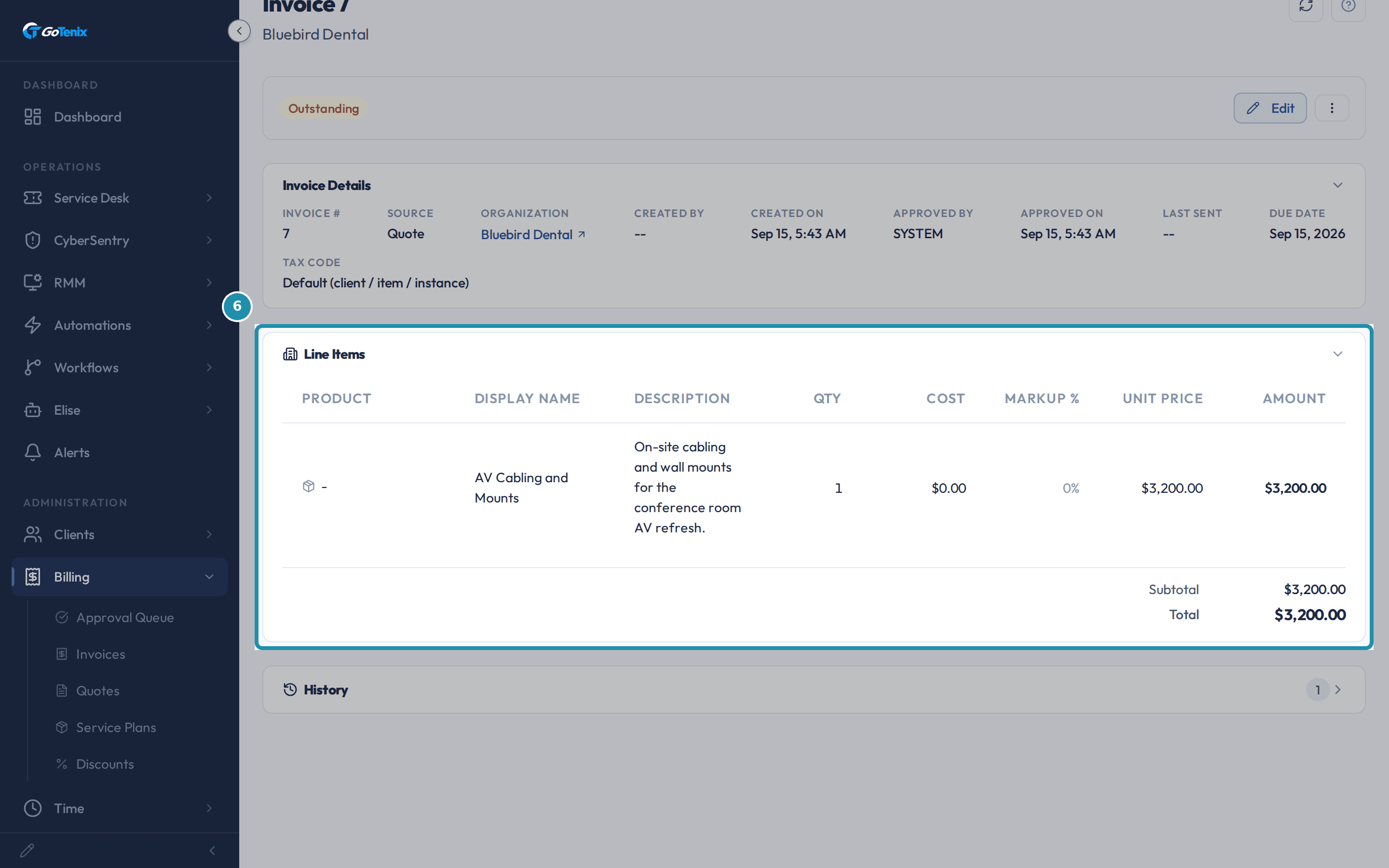
A converted quote has Source Quote (or Ticket, if the quote came from a ticket) and lands Outstanding, or Paid if it was fully discounted, without waiting in the queue. Approved By shows who converted it, or SYSTEM when it converted automatically on the client's acceptance.
Read an invoice that came from a quote. Read a client's Invoices list by its Source column.
The Source column tells invoices apart without opening each one. A plan invoice reads Core, Add-On or License, Quote is a converted quote, Manual is typed by hand and Ticket Charges is the combined items and time invoice. Every Outstanding row is one to send or follow up before the month closes.
Ask Elise to find things.
Ask "Which invoices are waiting for approval?" and she lists the Pending Approval ones. Ask "List the outstanding invoices for Bluebird Dental" and she returns that client's Outstanding invoices. Ask "Which ticket items are waiting to be billed?" and she lists items queued for billing. Ask "What is ticket 17's billing status?" and she says whether its time is billable and, if you may see rates, at what rate. These are reads, so nothing changes.
Ask Elise to change things.
Ask "Approve invoices 41 and 42" and she shows an approval card; you approve with one tap. Ask "Generate this month's invoice for Bluebird Dental's Managed Desktop plan now" and she builds it ahead of the schedule, after the same kind of approval; it follows your Auto-Approve setting. Ask "Change ticket 17's billing status to a billable one" and she shows a Confirm card first, because billing scope is money. Each of these needs the matching billing or ticket permission on your account.
The pages behind each click
What you will have
- Approve, reject or skip each invoice waiting in the Approval Queue.
- See billable time that will not invoice, and the reason.
- Build a client's ticket charges now instead of waiting for the monthly run.
- Tell invoices apart by their source, such as Core, Quote, Manual and Ticket Charges.
- Ask Elise to run the month-end rounds.
Why it works this way: How to go from agreements to invoices at month end
Generated plan invoices wait in Pending Approval for a person to look at them, unless Auto-Approve Generated Invoices is on. That setting is off by default.
Ticket charges are one invoice per client that combines issued items and billable time. They are built by the monthly run, and only from closed tickets. Generate Ticket Charges Now on a client's Billing, then Invoices, builds the same invoice on demand.
A quote that converts to an invoice does not go through the Approval Queue. It lands Outstanding, approved by the person who converted it, or by SYSTEM when the conversion happened automatically on the client's acceptance.
Other ways to do this: How to go from agreements to invoices at month end
Auto-approve
Turn on Auto-Approve Generated Invoices and generated plan invoices go straight to Outstanding. The Make GoTenix my PSA wizard advises keeping approval manual until a few cycles come out clean.
If it did not work: How to go from agreements to invoices at month end
- Time is billable but nothing appears in the queue: ticket charges are built monthly, and only from closed tickets. Close the ticket, or press Generate Ticket Charges Now on the client's Invoices tab.
- A Ticket Charges banner names a status with no mapped product: the status needs a product mapped to it before its time can be priced.
- A plan's period is not in the Approval Queue: check whether it already billed this month, or whether Auto-Approve Generated Invoices sent it straight to Outstanding.
Questions this page answers
What do the invoice source labels mean?
Every invoice carries a source label that says where it came from. Ticket Charges covers items and time from a closed ticket. Items and Billable Time are older versions of that same label. You may still see them on old invoices made before items and time were combined into one Ticket Charges label. Ticket means a quote that was tied to a ticket. Quote means an accepted quote with no ticket. Manual means somebody built it by hand. Plan invoices use the plan type, such as Core, License or Add-On. QB Sync marks an invoice pulled in from QuickBooks.
How do plan invoices work?
Plan invoices are made for you on a schedule. That can be monthly, quarterly or annual. They come from a client's active plans. Each line works out its own amount. That can be a synced user or device count, a manual count, a count of tagged things, a Microsoft licence count, or a flat price band by client size. The job runs every day at 7 AM in your instance timezone. Ticket charge invoices are made once a month instead, on the 1st.
Was this helpful?